

AFTER THIS LESSON
You will be able to
- Validate the token, market type, and transfer path before numbers
- Read Sell/Buy and Short/Long correctly
- Distinguish funding rates, directional delta, and the ROI adjustment
- Separate estimates from actual execution
PRACTICE ON REAL SCREENS
IXOR and exchange examples
Interfaces and live market values may change. Use each screen to understand what to verify, not as a current trade setup.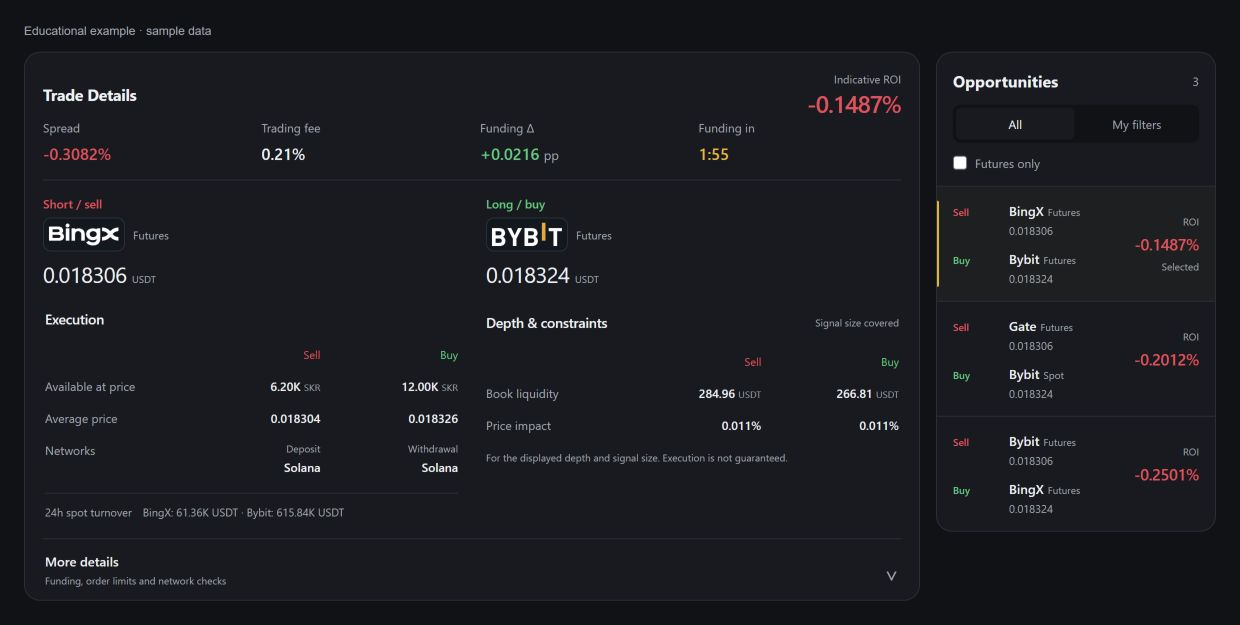
An educational view of the updated interface with sample numbers, not a live trading signal. Check the token, markets and direction first, then execution, depth, warnings and additional data.
0. Where to find data on the token page
Trade Details groups ROI, spread, fee, directional funding Δ and the settlement countdown at the top. Sell and Buy below show the market type and price; each exchange logo opens its market.
In Execution, compare available size and average prices. The sell exchange shows deposit status; the buy exchange shows withdrawal status. In Depth & constraints, check liquidity and price impact; missing data does not mean zero risk.
Expand More details for each exchange's funding rate, order limits and detailed network checks. Warnings remain visible while it is collapsed. TOKENUSDT ROI History below belongs to the selected route.
- In Opportunities, select the row for the required exchanges: ROI is on the right and a thin stripe marks the selected route.
- All and My filters change the route list; Futures only is a separate filter. Selecting a route does not place a trade.
1. Instrument identity
Start with the ticker, exchanges, market type, and contract specification. The same ticker can represent different assets, multipliers, or renamed instruments across exchanges.
- Confirm spot/futures and quote asset.
- Review collision, migration, or delisting warnings.
- Open both exchange contract pages.
2. Direction and prices
In a futures–futures signal, Sell means Short on the more expensive market and Buy means Long on the cheaper market. Current prices refer to the relevant book boundaries but may move before your order.
- Do not swap exchanges or position sides.
- Compare the top price with the average price for your intended size.
- The weaker leg by depth limits the entire route.
3. Cost and timing
IXOR spread is already reduced by the full round-trip taker fee for both legs. Funding is shown separately and feeds the ROI funding adjustment; the countdown points to the next settlement event.
The message contains three different measures. Sell and Buy rates are raw exchange values. Funding Δ already accounts for direction: Sell/Short rate minus Buy/Long rate. Funding adjustment is the price-weighted value included in ROI.
Mini example: Sell/Short +0.01% and Buy/Long −0.01% produce a +0.02% funding delta. Positive means the current rate difference favors the route; negative would add cost. Actual cash flow occurs only at the relevant exchange settlement.
- Actual fees depend on order type and your exchange tier.
- Funding rate can change before settlement.
- A positive delta does not mean both exchanges will settle during the holding period.
- The chart link opens history for the selected route.
4. Network for Spot → Futures
For a Spot → Futures route, IXOR compares the withdrawal network on the buy exchange with the deposit network on the sell exchange. “Withdrawal and deposit networks match” means a common canonical network was found.
Each side is shown separately: an available withdrawal remains visible when deposit on the other exchange is closed or unknown.
“Asset verified on this network” means the available exchange token identifiers matched or the system recognized a native asset. If an exchange does not expose enough data, IXOR requests manual verification.
- The destination-exchange Spot price and delta are shown only as fresh reference data.
- The block is not included in ROI and does not affect signal publication.
- Before transferring, recheck deposit and withdrawal status and the address in both exchange interfaces.
5. The correct review order
Use the same order for every message to reduce the chance of missing contract or execution risk because of a large ROI.
- Token → contract → market type.
- Sell/Buy → prices → average prices → available size.
- Fees → funding → countdown → chart → warnings.
- Only then consider size, leverage, and execution plan.
PRACTICE
Review one message
Open any current signal and explain every line aloud. If you cannot explain or verify a field on the exchange, do not advance to the next step.
? Show answer
Answer: Reference order: token → contract → market type; Sell/Buy → executable bid/ask → average prices and size; fees → funding → countdown; for Spot → Futures, withdrawal and deposit networks; then warnings and chart. Only after that should size, leverage, and the execution plan be chosen.
Lesson checklist
- For Spot → Futures, withdrawal and deposit networks match and the asset is verified.
- I did not swap Short and Long.
- Average prices and size fit my intended notional.
- I considered fees, funding, countdown, and warnings.
Common mistakes
- Starting with ROI and missing a warning.
- Treating 24h volume as immediately executable depth.
Progress is recorded automatically when this section appears on screen.